系统架构
IfAI 采用混合架构,结合 React/TypeScript 前端与通过 Tauri 2.0 驱动的 Rust 后端。这种设计在保持 Web 开发灵活性的同时提供原生性能。
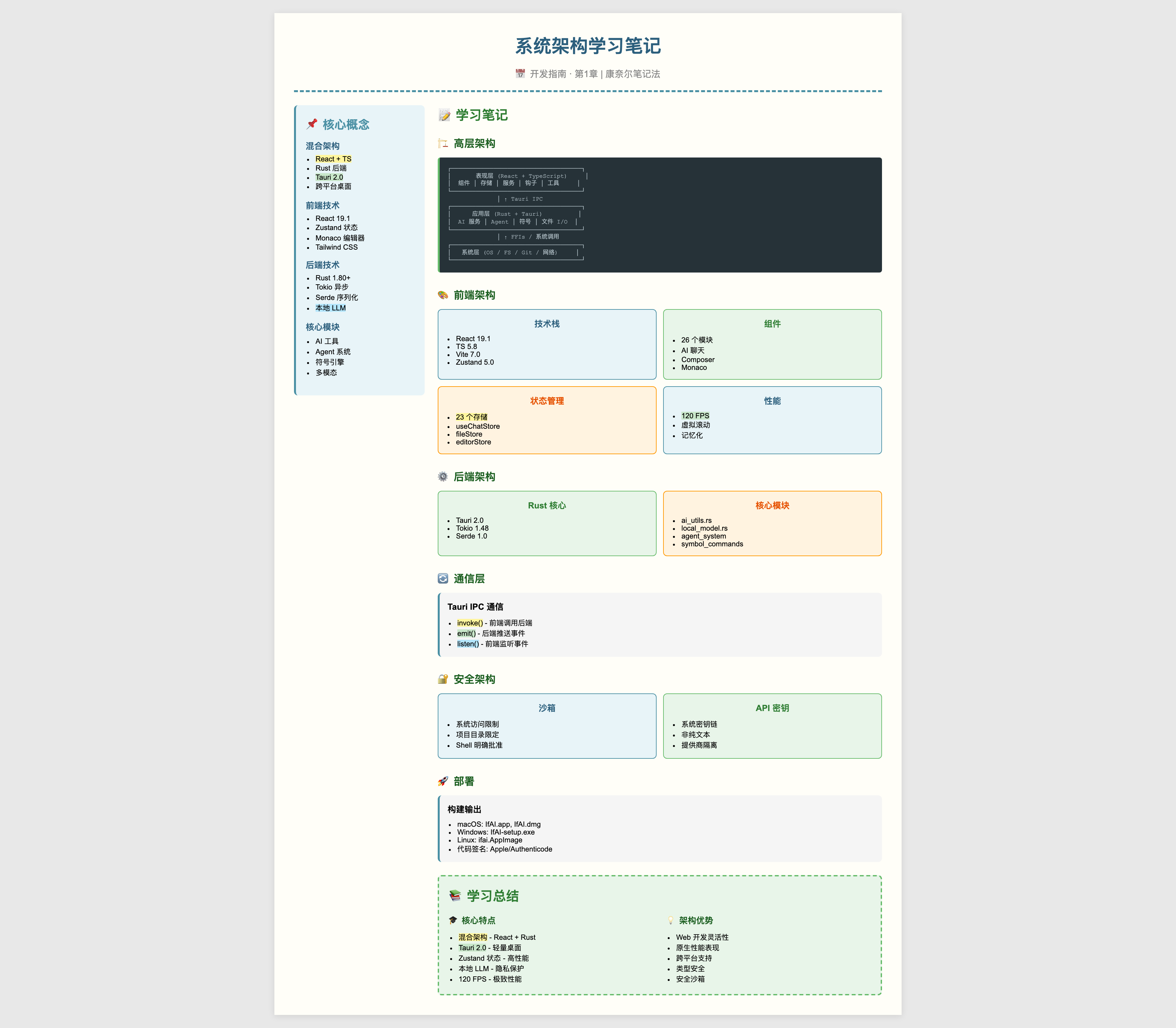
高层架构
┌─────────────────────────────────────────────────────────┐
│                      表现层                             │
│                  (React + TypeScript)                   │
├─────────────────────────────────────────────────────────┤
│  组件   │  存储  │  服务  │  钩子  │ 工具 │
└─────────────────────────────────────────────────────────┘
                         │ ↑
                         │ Tauri IPC (命令/事件)
                         │
┌─────────────────────────────────────────────────────────┐
│                       应用层                            │
│                     (Rust + Tauri)                      │
├─────────────────────────────────────────────────────────┤
│  核心模块 │ AI 服务 │ Agent 系统 │ 文件 I/O            │
└─────────────────────────────────────────────────────────┘
                         │ ↑
                         │ FFIs / 系统调用
                         │
┌─────────────────────────────────────────────────────────┐
│                        系统层                           │
│  (操作系统 / 文件系统 / Git / 终端 / 网络)              │
└─────────────────────────────────────────────────────────┘前端架构
技术栈
| 技术 | 版本 | 用途 |
|---|---|---|
| React | 19.1.0 | UI 框架 |
| TypeScript | 5.8 | 类型安全 |
| Vite | 7.0 | 构建工具 |
| Zustand | 5.0 | 状态管理 |
| Monaco Editor | 0.55 | 代码编辑器 |
| TailwindCSS | 3.4 | 样式 |
目录结构
src/
├── components/          # React 组件 (26 个模块)
│   ├── AIChat/         # AI 聊天面板
│   ├── Composer/       # 多文件编辑器
│   ├── Editor/         # Monaco 封装
│   ├── FileTree/       # 项目文件浏览器
│   ├── Terminal/       # 集成终端
│   └── ...
│
├── stores/             # Zustand 状态存储 (23 个存储)
│   ├── useChatStore.ts # 主聊天逻辑
│   ├── fileStore.ts    # 文件管理
│   ├── editorStore.ts  # 编辑器状态
│   └── ...
│
├── services/           # 业务逻辑
│   ├── codeAnalysis.ts
│   ├── errorFixService.ts
│   └── ...
│
├── hooks/              # 自定义 React 钩子
├── utils/              # 工具函数
├── i18n/               # 国际化
├── core/               # 核心抽象
└── types/ # TypeScript 定义组件架构
┌─────────────────────────────────────────────────────────┐
│                        布局                             │
│  ┌────────────┬───────────────────────┬────────────────┐│
│  │            │                       │                ││
│  │  文件树    │    编辑器容器         │   右侧面板    ││
│  │            │   ┌─────────────────┐ │                ││
│  │            │   │  Monaco 编辑器  │ │  ┌──────────┐  ││
│  │            │   │                 │ │  │ AI 聊天  │  ││
│  │            │   │                 │ │  │          │  ││
│  │            │   │                 │ │  │          │  ││
│  │            │   └─────────────────┘ │  └──────────┘  ││
│  │            │                       │                ││
│  └────────────┴───────────────────────┴────────────────┘│
│  ┌────────────────────────────────────────────────────┐ │
│  │  终端                                              │ │
│  └────────────────────────────────────────────────────┘ │
└─────────────────────────────────────────────────────────┘状态管理 (Zustand)
IfAI 使用 Zustand 进行轻量级、高性能的状态管理:
typescript
// 示例:文件存储
interface FileStore {
  files: Map<string, FileInfo>
  activeFile: string | null

  // 操作
  openFile: (path: string) => Promise<void>
  saveFile: (path: string, content: string) => Promise<void>
  closeFile: (path: string) => void
}

export const useFileStore = create<FileStore>((set, get) => ({
  files: new Map(),
  activeFile: null,

  openFile: async (path) => {
    const content = await invoke('read_file', { path })
    set((state) => ({
      files: new Map(state.files).set(path, { path, content })
    }))
  },

  // ... 更多操作
}))核心存储
| 存储 | 用途 |
|---|---|
useChatStore | AI 对话逻辑 (100KB+) |
fileStore | 文件操作和管理 |
editorStore | 编辑器状态和设置 |
agentStore | Agent 执行和监控 |
settingsStore | 用户偏好设置 |
后端架构
技术栈
| 技术 | 版本 | 用途 |
|---|---|---|
| Rust | 1.80+ | 后端语言 |
| Tauri | 2.0 | 桌面框架 |
| Tokio | 1.48 | 异步运行时 |
| Serde | 1.0 | 序列化 |
目录结构
src-tauri/src/
├── lib.rs                    # 主入口
├── ai_utils.rs               # AI 工具
├── local_model.rs            # 本地 LLM 支持
├── intelligence_router.rs    # AI 路由逻辑
├── multimodal.rs             # 图像处理
│
├── commands/                 # Tauri 命令
│   ├── atomic_commands.rs    # 文件操作
│   ├── core_wrappers.rs      # 核心功能
│   └── symbol_commands.rs    # 符号索引
│
├── agent_system/             # Agent 框架
│   ├── supervisor.rs
│   └── toolchain.rs
│
├── conversation/             # 聊天管理
├── openspec/                 # OpenSpec 协议
├── prompt_manager/           # 提示词模板
│
└── llm_inference/ # 本地推理 (可选)核心模块
1. AI 工具 (ai_utils.rs)
处理 AI 模型交互:
rust
pub async fn chat_completion(
    messages: Vec<Message>,
    provider: AIProvider,
) -> Result<String, Error> {
    match provider {
        AIProvider::OpenAI => openai_client().chat(messages).await,
        AIProvider::Anthropic => claude_client().chat(messages).await,
        AIProvider::Local => local_llm().chat(messages).await,
    }
}2. 本地模型 (local_model.rs)
通过 llama-cpp-2 支持本地 LLM:
rust
pub struct LocalLLM {
    model: LlamaModel,
    context: LlamaContext,
}

impl LocalLLM {
    pub fn new(model_path: &Path) -> Result<Self> {
        let params = LlamaParams {
            n_ctx: 2048,
            n_batch: 512,
            ..Default::default()
        };
        // ... 初始化
    }
}3. Agent 系统 (agent_system/)
自主任务执行:
rust
pub struct Agent {
    id: String,
    state: AgentState,
    tools: Vec<Box<dyn Tool>>,
}

impl Agent {
    pub async fn execute_task(&mut self, task: Task) -> Result<TaskResult> {
        for step in task.steps {
            let tool = self.select_tool(&step)?;
            let result = tool.execute(step.params).await?;
            self.update_state(result)?;
        }
        Ok(TaskResult::Success)
    }
}4. 符号引擎 (symbol_commands.rs)
代码结构理解:
rust
pub struct SymbolEngine {
    parser: tree_sitter::Parser,
    index: HashMap<String, Symbol>,
}

impl SymbolEngine {
    pub fn index_project(&mut self, root: &Path) -> Result<usize> {
        let files = walk_directory(root)?;
        for file in files {
            let symbols = self.parse_file(&file)?;
            self.index.insert(file.path, symbols);
        }
        Ok(self.index.len())
    }
}通信层
Tauri IPC
前端和后端通过 Tauri 的 IPC 通信:
typescript
// 前端:调用后端命令
import { invoke } from '@tauri-apps/api/core'

const content = await invoke('read_file', { path: '/path/to/file' })rust
// 后端:注册命令
#[tauri::command]
async fn read_file(path: String) -> Result<String, String> {
    fs::read_to_string(&path).map_err(|e| e.to_string())
}事件系统
后端向前端推送事件:
rust
// 后端:发送事件
app.emit("file-changed", FileChangeEvent { path: "/src/main.rs" })?;typescript
// 前端:监听事件
import { listen } from '@tauri-apps/api/event'

await listen('file-changed', (event) => {
    console.log('文件已更改:', event.payload)
})数据流
AI 聊天流
用户输入 (React)
    │
    ▼
useChatStore (前端)
    │
    ├─▶ 构建上下文 (文件、符号、历史)
    │
    ▼
invoke('ai_chat', { messages, context })
    │
    ▼
commands::ai_chat (Rust)
    │
    ├─▶ intelligence_router (选择模型)
    │
    ▼
ai_utils::chat_completion
    │
    ├─▶ OpenAI / Anthropic API
    ├─▶ 本地 LLM (llama-cpp-2)
    │
    ▼
流式响应 (SSE)
    │
    ▼
前端更新 (React)文件操作流
用户操作 (打开文件)
    │
    ▼
fileStore.openFile(path)
    │
    ▼
invoke('read_file', { path })
    │
    ▼
commands::fs_read_file (Rust)
    │
    ├─▶ 检查文件监视器缓存
    ├─▶ 从磁盘读取
    │
    ▼
返回内容到前端
    │
    ▼
更新 Monaco 编辑器性能架构
渲染
- 120 FPS 目标:亚 16ms 帧时间
- 虚拟滚动:
@tanstack/react-virtual用于大列表 - 记忆化:React.memo 用于昂贵组件
文件系统
- 增量索引:仅扫描更改的文件
- 懒加载:按需加载文件
- 缓存:热文件的 LRU 缓存
AI 请求
- 流式:服务器发送事件实现实时响应
- 请求批处理:合并多个请求
- 上下文压缩:智能令牌管理
安全架构
沙箱
- Tauri 的安全模型限制系统访问
- 文件系统访问范围限定到项目目录
- Shell 命令需要明确批准
API 密钥
- 存储在系统密钥链中(非纯文本)
- 从不记录或传输
- 按提供商隔离
本地 LLM
- 所有处理在设备上进行
- 推理无网络请求
- 敏感代码完全私密
部署
构建过程
bash
# 开发
npm run tauri dev

# 生产构建
npm run tauri build

# 输出:
# - macOS: IfAI.app, IfAI.dmg
# - Windows: IfAI-setup.exe
# - Linux: ifai.AppImage代码签名
- macOS:Apple 开发者证书
- Windows:Authenticode 证书
- Linux:GPG 签名(可选)
监控与调试
前端
- React DevTools
- Zustand DevTools
- 性能分析器
后端
tracingcrate 用于结构化日志sentry-panic用于崩溃报告commands/中的自定义指标
错误处理
rust
#[derive(Debug, thiserror::Error)]
pub enum IfAIError {
    #[error("IO 错误: {0}")]
    Io(#[from] std::io::Error),

    #[error("AI 提供商错误: {0}")]
    AI(String),

    #[error("解析错误: {0}")]
    Parse(String),
}参考
学习笔记
贡献
参见贡献指南了解开发设置。